Business Settings
Migration notice: This page was converted from the legacy TO3000 3D CHM. Classification: KEEP. Legacy wording is evidence only — verify against current TO3000 7.1 / qa before treating as authoritative.
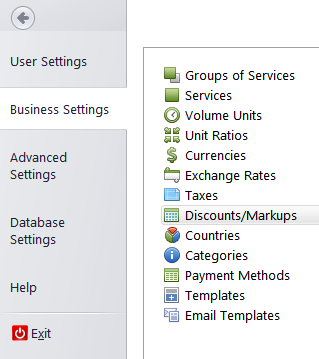
To open the Business Settings window, enter the Backstage view and click the Business Settings option.
-
Groups of Services — enter broad categories of the services you provide. This info is used in price, quote and job records.
-
Services — each group contains a separate list of services (most commonly these are language pairs). Also used in price, quote and job records.
-
Volume Units — in addition to standard volume units you can add custom units to account prices, quotes and jobs in.
-
Unit Ratios — set up “exchange rates” between your base unit and other units. These rates will be used to calculate the total volume of work over a specific periods.
-
Currencies — currencies can be added from here.
-
Exchange Rates — set up exchange rates between your base currency and other currencies. These rates will be used to keep records in two currencies for your clients.
-
Taxes — taxes are used in invoices. You can add or edit taxes here.
-
Discounts/Markups — add or edit discounts and markups here. Once added, these can later be inserted into invoices.
-
Categories — add or edit categories which are used in Info tab.
-
Countries — by default, the database contains a list of all countries (used in client profiles). This list can be edited here.
-
Payments Methods — payment methods and their descriptions can be added to invoices.
-
Templates — manage the RTF templates for all work documentation.
-
Email templates — manage the text templates for the Mail Sender.

See also: