Exchange Rates
Migration notice: This page was converted from the legacy TO3000 3D CHM. Classification: KEEP. Legacy wording is evidence only — verify against current TO3000 7.1 / qa before treating as authoritative.
TO3000 3D provides you with the ability to assign a different client currency to each client, and still be able to see ‘the whole picture’ using your base currency. (The base currency is set in the General section of the Advanced Settings window)
On the Exchange Rates tab of the Business Settings window you can specify the exchange rates between your base currency and other currencies used.
To open the Exchange Rates tab click Exchange Rates in the left part of the Business settings window.
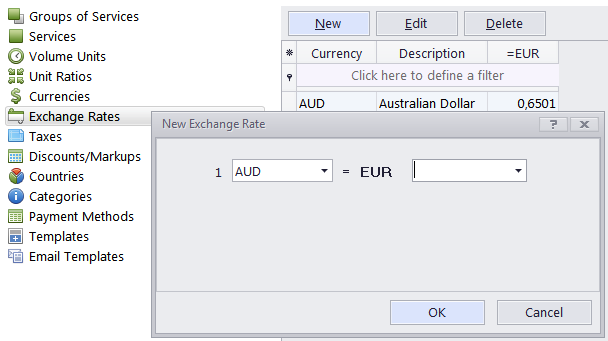
To create a new exchange rate record click the New button, select the required foreign currency from the drop-down list and specify the rate.
 NOTE: The currencies list consists of currencies added on the Currencies tab of the Business settings window.

See also: