Ribbon
Migration notice: This page was converted from the legacy TO3000 3D CHM. Classification: KEEP. Legacy wording is evidence only — verify against current TO3000 7.1 / qa before treating as authoritative.
The Ribbon is a part of the TO3000 user interface designed to make navigating the program more intuitive.
In each of the five sections on the Navigation Bar, the Ribbon contains a unique set of icons, grouped into tabs, for accessing various related windows or performing other functions.
You can collapse (minimize) the Ribbon either by right-clicking one of the tabs and clicking “Minimize the Ribbon”, or by clicking the “Collapse the Ribbon” button in the lower-right corner of the Ribbon.
To pin the Ribbon, so that it is always displayed, do the above actions again.
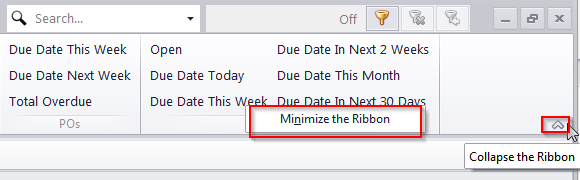
While collapsed, the Ribbon’s icons will only be displayed when you click on a tab, and will be hidden when you click outside the Ribbon.

See also: