Folders
Migration notice: This page was converted from the legacy TO3000 3D CHM. Classification: KEEP. Legacy wording is evidence only — verify against current TO3000 7.1 / qa before treating as authoritative.
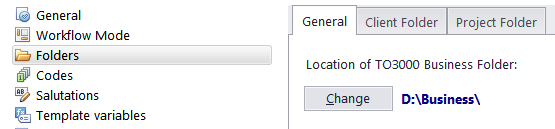
The location of Business folder as well as automatic folder creation options can be changed via the Folders section of the Advanced Settings window.
To change the location of Business folder:
1. Go to Backstage > Advanced Settings.
2. Click the Folders section.
3. Click the Change button.
Additional folder settings
To add custom subfolders to Client or Project folders, open the respective tab (Client Folder, Project Folder (With Projects Mode only) or Client Job Folder (Without Projects Mode only), and create the required folders there. Any folders added to the folder structure this way will be automatically added to each new Client or Project folder.
To disable the automatic creation of Client or Project folders, clear Automatic Folder Creation check boxes on the Client Folder or Project Folder tab.
 NOTE: This will only affect the folders created after the change. Existing folders will not be altered.
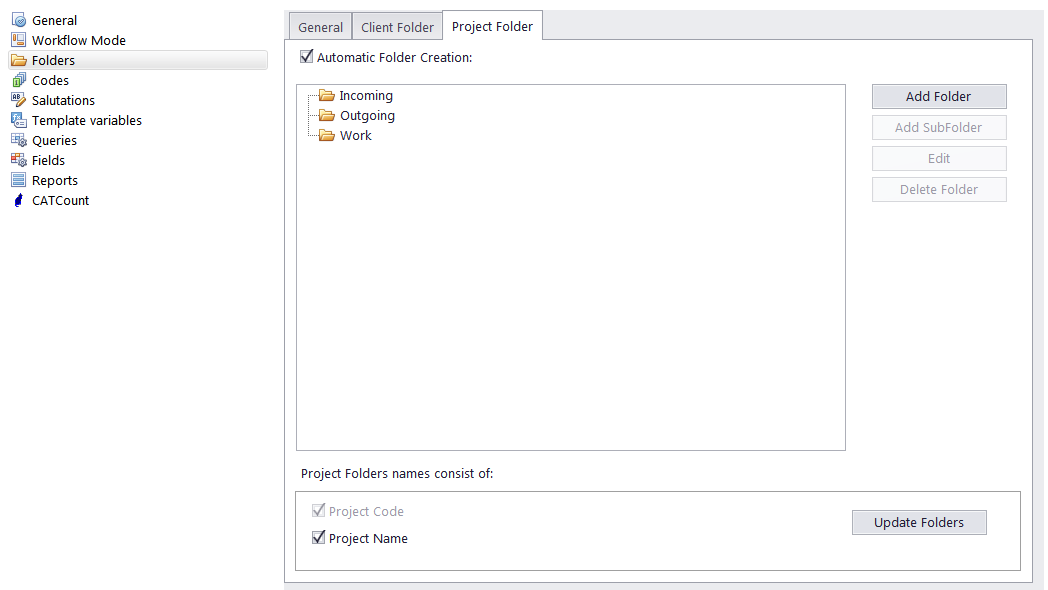
The Project folder tab has an additional option - set whether Project names are included in the names of individual project folders. Click Update Folders to immediately rename all existing project folders.

See also: