Appearance
Migration notice: This page was converted from the legacy TO3000 3D CHM. Classification: REWRITE. Legacy wording is evidence only — verify against current TO3000 7.1 / qa before treating as authoritative.
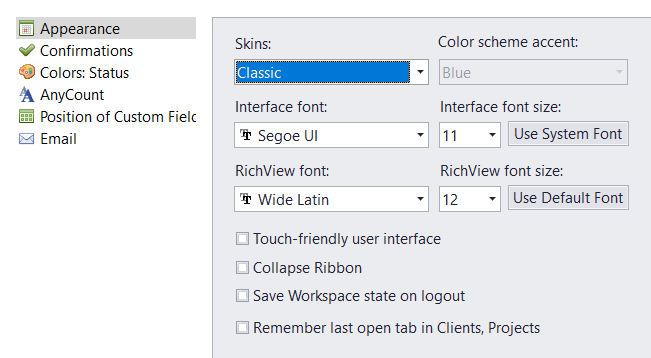
Here you can customize the general appearance of TO3000 3D.
Skins - choose between several skins for TO3000.
Color Scheme Accent is only active when No Skin is selected and determines the color of the header in the main window and the sidebar in the Backstage view.
Interface Font and Interface Font Size - chose and size the font used for the Projetex interface and tables.
Use System Font instantly switches the used font to the one used by your system interface.
Rich-View Font and RichView font Size - Choose the default font for large test fields like the General Information fields or Knowledgebase topics.
Use Default Font resets the RichView font to Times New Roman, size 12.
Touch-Friendly User Interface - check this to make interface buttons larger and easier to use with a touchscreen.
Collapse Ribbon - check to hide the Ribbon whenever it is not in active use. This can also be set by right-clicking the Ribbon itself.
Save Workspace state on logout - check to save the state of all windows open in the Workspace and re-open them automatically when you launch the program next time.
Remember last open tab in Clients, Projects - if checked, new Clients and Projects windows will open on the same tab the last window of the same type was closed on. Otherwise, they will always open on the Main tab.

See also: