Project Window
Migration notice: This page was converted from the legacy TO3000 3D CHM. Classification: KEEP. Legacy wording is evidence only — verify against current TO3000 7.1 / qa before treating as authoritative.
The Project Window can be used to view, edit and enter new information about your projects, as well as to create and manage Client jobs and Project files.
To open the Project window click the Project icon from the Projects tab of the Ribbon.
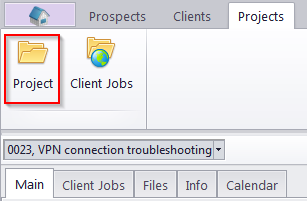
Project Window tabs
Different tabs of the Project window represent different aspects and elements of your projects, stored in the TO3000 3D database. Project data is broken into the following Project window tabs:
-
The Main tab – provides the most basic overview of your Projects. Projects are created and marked as completed here. This tab also contains Project Profiles.
-
The Client Jobs tab – gives an overview of Client Jobs of a Project. Client Jobs can be created here as well.
-
The Files tab – provides quick access to the project folder of the selected Project, as well as to other files related to this Project.
-
The Info tab – this tab is used for creating various project–related notes.
-
The Calendar tab – a schematic overview of Project jobs, presented in the form of a calendar.

See also: