Moving columns
Migration notice: This page was converted from the legacy TO3000 3D CHM. Classification: MERGE. Legacy wording is evidence only — verify against current TO3000 7.1 / qa before treating as authoritative.
You can easily change the order of the columns displayed. To change column order:
1. Click the column caption and hold the mouse button.
2. Drag your cursor without releasing the mouse button, to the desired column.
3. Release the mouse button. The column will be moved to the place indicated by the green arrows.

 Note: Optionally you can click and drag entries in the Customize Columns window described above to change the order of the columns.
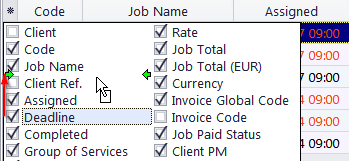
To open the Customize Columns window, click the Asterisk symbol  in the top-left corner of a table.

See also: