Prospect Invoices window
Migration notice: This page was converted from the legacy TO3000 3D CHM. Classification: KEEP. Legacy wording is evidence only — verify against current TO3000 7.1 / qa before treating as authoritative.
The Prospect Invoices window displays a general overview of all invoices, issued to all former or inactive clients in the database. It can be used to identify currently unpaid invoices and obtain a total of balance due according to all invoices issued.
The options available for this window are the same as those for the Invoices tab of the Prospect window. The major difference is that the Prospect Invoices window displays all invoices for all former or inactive clients.
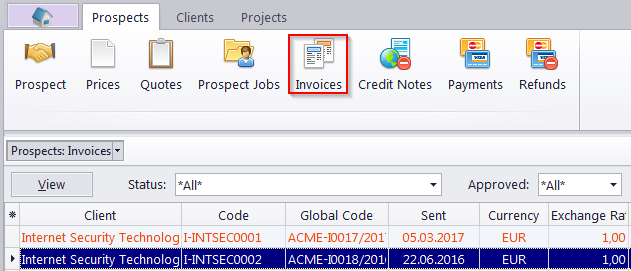
Filters
Use the Status filter drop-down list to display only invoices a specific status.
Use the Approved filter drop-down list you can select to display only those invoices which have or have not been approved by you.
Invoice Status
Currently issued invoices can marked in one of four colors, depending on the status of the invoice:
- Green — the invoice is Outstanding and is expected to be paid soon.
- Blue — the invoice is Outstanding and is expected to be paid today.
- Red — the invoice is Outstanding and its payment is overdue.
- Black — the invoice has been Settled (paid).
 Note: You can change the colors on the Colors: Status tab of the User Settings menu in the Backstage view.
TO3000 automatically assigns statuses to Invoices depending on the Payment Terms set for each client.

See also: