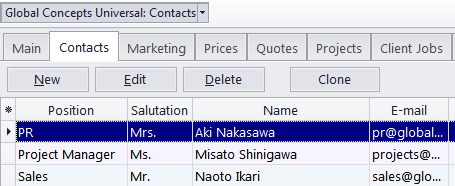
Client window Contacts tab
Migration notice: This page was converted from the legacy TO3000 3D CHM. Classification: KEEP. Legacy wording is evidence only — verify against current TO3000 7.1 / qa before treating as authoritative.
A Client’s Contacts are persons on the client side which you work with regarding this client’s projects.
·Contacts can be associated with projects (by putting one of the client’s contacts into the Client PM field).
·Contacts of the client can also be a added to invoices’ Attention fields.
To manage your client contacts, open the Main tab of the Client window, select the required Client and click the Contacts tab.
Here you can create new contacts, as well as edit, delete and clone existing ones.

See also: