Void Invoices
Migration notice: This page was converted from the legacy TO3000 3D CHM. Classification: REWRITE. Legacy wording is evidence only — verify against current TO3000 7.1 / qa before treating as authoritative.
To void an invoice, select it in a client’s Invoices tab and click Void.
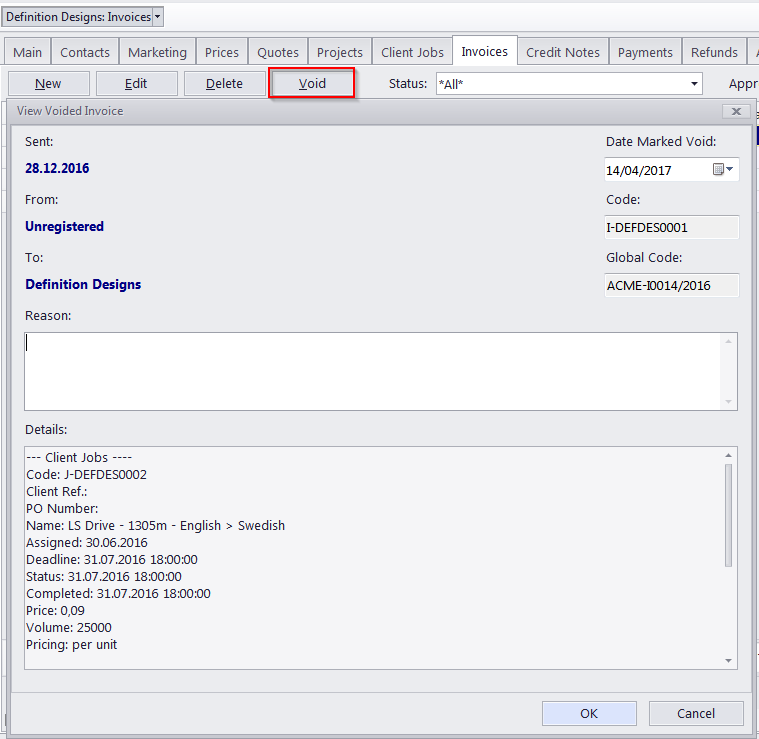
By voiding an invoice, you do not delete it from your invoices list. However, once voided, the invoice cannot be printed or edited, and the jobs added to this invoice revert to Uninvoiced status.
When voiding an invoice you can enter the reason for voiding, and specify the date (will be used by Global Date Filter).
The details of a void invoice are kept in the database as a plain text note for future reference. The following data will be preserved in a void invoice:
- Client Jobs: Code, Client Ref., PO Number, Name, Assigned, Deadline, Completed, Price, Volume, Exchange Rate: Total
- Discounts
- Taxes
An invoice cannot be voided if it has linked payments.
Void invoices are displayed in all invoice lists.

See also: