Prospect FTP connections
Migration notice: This page was converted from the legacy TO3000 3D CHM. Classification: KEEP. Legacy wording is evidence only — verify against current TO3000 7.1 / qa before treating as authoritative.
FTP (File Transfer Protocol) is a common method of sharing and exchanging work files. Each prospect profile in TO3000 can have a number of FTP connections (addresses of shared folders) associated with it. These folders can then quickly be accessed by any user working with the Files tab of this Prospect.
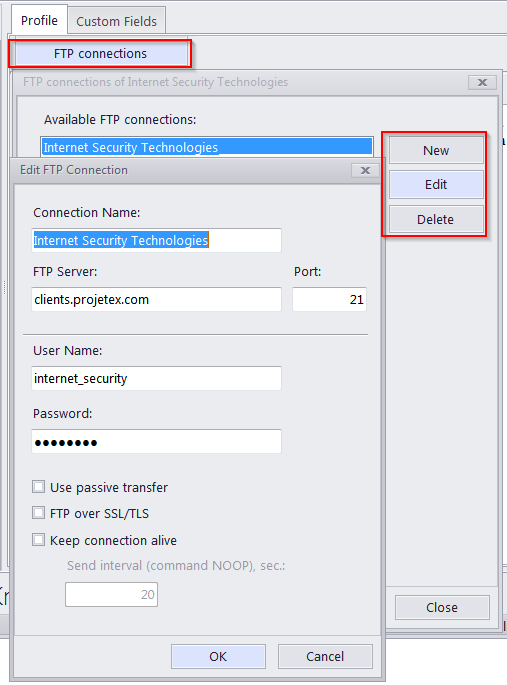
The FTP Connection interface in TO3000 allows for quick access to the specified FTP folder without having to re-type the login and password each time you connect. The following details can be specified when creating a connection:
Connection Name — this name has no syntax requirements and can be no longer than 50 characters.
FTP Server — the address of the FTP server (for example ftp.server.com). Can be no longer than 50 characters. You can also specify which Port to use.
User Name — the login, normally issued by the FTP server administrator. This login will be used when TO3000 attempts to connect to the FTP folder. Can be no longer than 50 characters.
Password — this password will be used when TO3000 attempts to connect to the FTP folder. Can be no longer than 50 characters.
The Passive file transfer option allows you to enable passive mode for this connection. Consult your FTP server administrator regarding the type of file transfer you should use. If you are unsure, you can leave the Passive file transfer check box empty.
Enable FTP over SSL/TLS if the connection supports encryption. Consult your FTP server administrator as to whether you should use this option.
The Keep connection alive option sets whether TO3000 should continue trying to connect to a non-responding FTP address. If this option is enabled, you can also set the interval between connection attempts.
To add, edit or delete the FTP connections of a certain prospect, click the FTP Connections button in this prospect’s profile.

See also: