Creating clients
Migration notice: This page was converted from the legacy TO3000 3D CHM. Classification: KEEP. Legacy wording is evidence only — verify against current TO3000 7.1 / qa before treating as authoritative.
Clients in TO3000 3D are created on the Main tab of the Client window. To create a Client record, please follow the steps below:
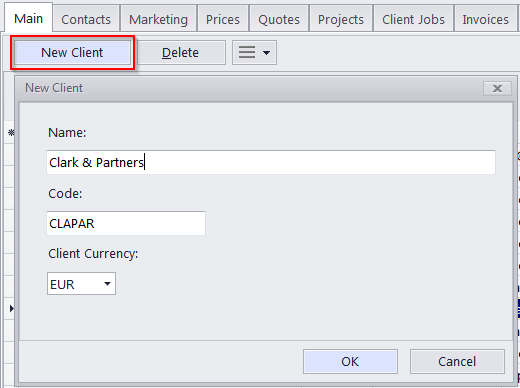
1. Click the New Client button above the Client list on the Client window > Main tab.
2. Fill the fields of the New Client window:
·Enter the name of the client in the Name text field.
·The code for the Client record will be generated automatically (usually contains the first letters of the Name) in the Code text field, but you can also edit it manually (12 symbols maximum).
·Select the Client Currency using the corresponding drop–down list.
·Click OK to confirm or Cancel to discard the entered information.

See also: