Mass payments from clients
Migration notice: This page was converted from the legacy TO3000 3D CHM. Classification: KEEP. Legacy wording is evidence only — verify against current TO3000 7.1 / qa before treating as authoritative.
Multiple payments from clients can be created according to existing invoices and linked with them.
1. To open the Mass Payments window, open the Clients: Payments window first, and then click Mass Payments button (shortcut Alt+M).
2. This will open Mass Payments window:
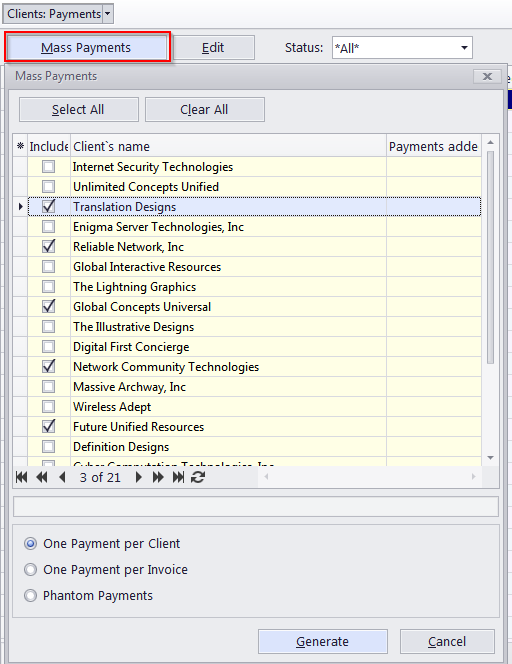
·Select the clients, whose invoices you wish paid, by double-clicking the check box in front of each client.
·Select one of three payment generation modes: create and link a single payment to all of a client’s invoices, create and link a separate payment for each invoice, or cover the invoices with Phantom payments.
3. After selecting the required clients and setting up mass payment options, click the Generate button. The program will begin creating payments. The process will be indicated by a progress bar.
4. Once all specified payments have been generated, the Mass Payments window will display the number of new payments created for each client.
5. You can adjust the settings and generate another set of payments.
 NOTE: Once the payments have been generated, they can be opened and edited in the Clients: Payments window or the Payments tab of the Client window.

See also: