Locale settings and date format
Migration notice: This page was converted from the legacy TO3000 3D CHM. Classification: KEEP. Legacy wording is evidence only — verify against current TO3000 7.1 / qa before treating as authoritative.
There are two ways of configuring the locale format:
1. In TO3000 3D (for each Client/Prospect individually):
·open the Client/Prospect window and click the Main tab;
·click the Locale Format button in the client profile;
·select Custom locale in the drop-down list next to Generation of RTF files: string;
·configure the code in Short Date Format or Long Date Format to include 4-5 capital M letters (like dd.MMMM.YYYY).
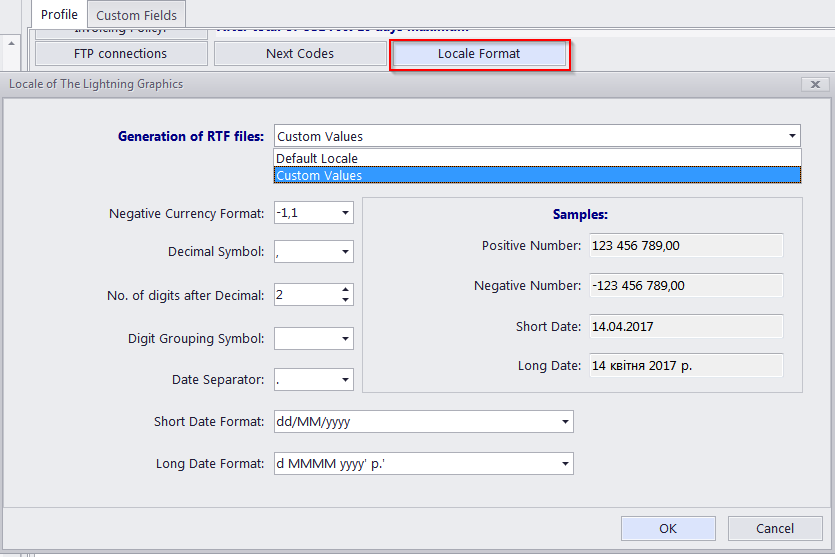
 NOTE: Please note that the Long Date Format is used for the “long” date variables: \DATE_DUE_LONG, \INVOICE_DATE_LONG, and so on. Settings in Short Date Format will affect regular variables, like \DATE_DUE, \INVOICE_DATE, and so on.
2. In the Windows Control Panel (these settings are used as default in TO3000 3D):
- open the Windows Control Panel
- double-click Regional and Language Options
- click the Customize button on the Regional Options tab
- click the Date tab
- configure the long (or short) date format options to include 4-5 capital M letters (like dd.MMMM.YYYY). To remove the full day of the week name from view, delete the extra “d” letters, so that no more than 2 “d-s” are present in the code string.

See also: