Knowledgebase Files Tab
Migration notice: This page was converted from the legacy TO3000 3D CHM. Classification: KEEP. Legacy wording is evidence only — verify against current TO3000 7.1 / qa before treating as authoritative.
The TO3000 knowledgebase has a dedicated folder where all useful reference files can be stored.
By default, the knowledgebase folders are found in C:\Business\KB.
The Files tab allows for easy management of such files. The tab shows the folder tree for the knowledgebase folder and the content of the currently selected sub-folder.
New subfolders can be created by right-clicking any existing folder in the tree view and selecting “New folder”
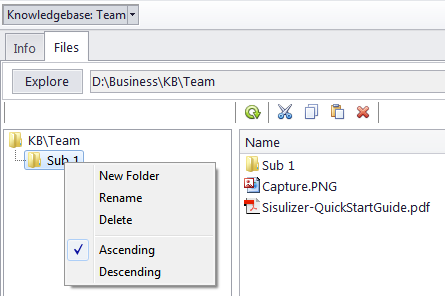
The Common file options buttons above the files list can be used to perform standard operations with selected files and folders. Left to right, these are Refresh, Cut, Copy, Paste, Delete.

See also: