Grouping records
Migration notice: This page was converted from the legacy TO3000 3D CHM. Classification: KEEP. Legacy wording is evidence only — verify against current TO3000 7.1 / qa before treating as authoritative.
In addition to traditional sorting, records in TO3000 tables can also be grouped.
This is especially useful if you want to look at records that have specific values in specific fields.
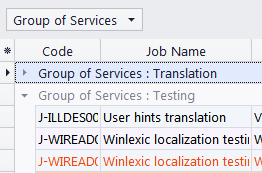
To group a table by a certain column, drag that column’s header into the Group Box.

The table will be displayed as a list of Groups (values of the column). You can click a Group to expand or collapse it.
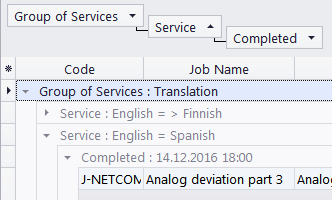
You can drag multiple headers into the Group Box to create a hierarchy of groups.
When you drag a header out of the Group Box, it will snap back into its previous position in the table.

See also: