Filter Box
Migration notice: This page was converted from the legacy TO3000 3D CHM. Classification: KEEP. Legacy wording is evidence only — verify against current TO3000 7.1 / qa before treating as authoritative.
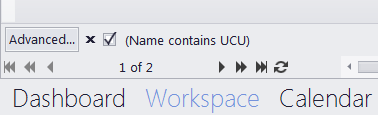
The Filter Box, located just above the Page Navigation panel, displays the filter currently in effect.
The check-box to the left of the filter expression will enable/disable the filter, while the X symbol will clear it.
Clicking the description will bring up a menu of the last eleven previously used filter expressions
The Advanced… button opens the Filter Builder.

See also: