Migration notice: This page was converted from the legacy TO3000 3D CHM. Classification: KEEP. Legacy wording is evidence only — verify against current TO3000 7.1 / qa before treating as authoritative.
Here you can set up an e-mail connection for TO3000.
Enter the Address, connection type, and access credentials (if needed) for your SMTP server.
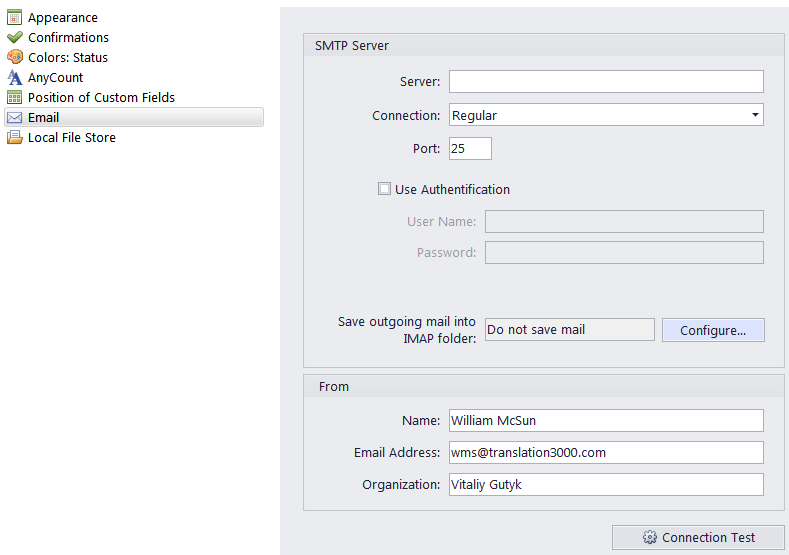
Also you can set up an IMAP folder to store your outgoing mail:
-
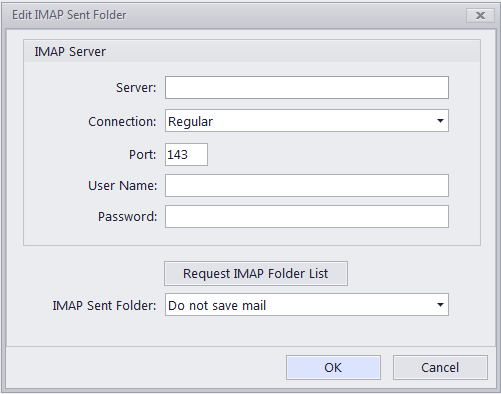
Click Configure to open the Edit IMAP Sent Folder window.
-
Enter the Address, connection type, and access credentials to the IMAP server.
-
Import the server’s folder list and choose the folder for your Sent mail.
You can also specify the default ‘From’ line of your TO3000-generated e-mails by entering your name, e-mail and company name.
Click Connection Test to check if the connection parameters were entered correctly.

See also: