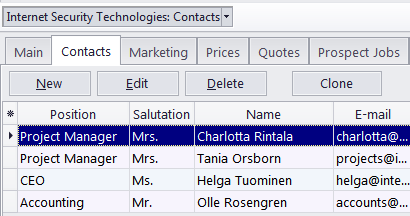
Prospect Window Contacts tab
Migration notice: This page was converted from the legacy TO3000 3D CHM. Classification: KEEP. Legacy wording is evidence only — verify against current TO3000 7.1 / qa before treating as authoritative.
A prospect’s Contacts are persons on the client side which you work with regarding this prospect’s potential projects/jobs.
The New button opens the New Contact window, where the details of a new contact person can be added.
The Edit button opens the Edit Contact window, where the details of the currently selected contact person can be edited.
The Delete button deletes the currently selected contact.
The Clone button creates a complete copy of the currently selected contact and adds it to the list of this prospect’s contacts. The cloned contact will have the (Cloned contact) text in front of the contact name.

See also: