Business Expenses
Migration notice: This page was converted from the legacy TO3000 3D CHM. Classification: KEEP. Legacy wording is evidence only — verify against current TO3000 7.1 / qa before treating as authoritative.
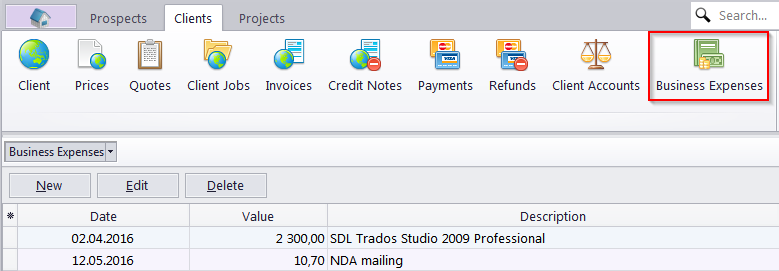
Any additional expenses can be entered into database with the help of the Business Expenses window. These expenses are used when calculating the total balance.
To open the Business Expenses window click on the Business Expenses icon in the Clients section of the Ribbon.
Business expense record contains default fields:
Date - the date when the expense was handled
Value - value of the business expense
Description - any additional information about the expense
The Custom Fields tab shows the custom fields for a particular record. New custom fields can be created in the Custom Fields section of Advanced Settings in TO3000 3D.

See also: